Python Fundamentals:
Unit Conversion Tool
A course-guided Python exercise used to practice core programming fundamentals and basic script extension.
Snapshot Overview
👨💻Context: Course-guided Python fundamentals project
🔨Tools: Python (command line / Jupyter)
🔢 Core Concepts: Conditional logic, user input, numeric operations
📊Original Scope: Inches, feet, yards
👥Personal Extension: Added support for miles in the conversion tool
🎯Purpose: Demonstrate foundational Python comprehension and control flow
Learning Context
This was a guided exercise from a Python fundamentals course: build a working command-line unit converter. I followed the course structure, then used the project to make sure I understood how each part of the code worked and to add a small extension of my own.
Goals: practice Python syntax, route user input with conditional logic, and apply numeric operations to real measurements.
My Contribution
After completing the guided portion of the project, I extended the script by adding miles as an additional conversion option.
This required:
Understanding how existing unit logic was structured
Adding new conditional branches for mile-based conversions
Applying appropriate conversion factors
Ensuring output formatting remained consistent with the rest of the script
I also adjusted numeric handling to support decimal-based inputs and standardized output formatting by rounding results to three decimal places.
How the Script Works
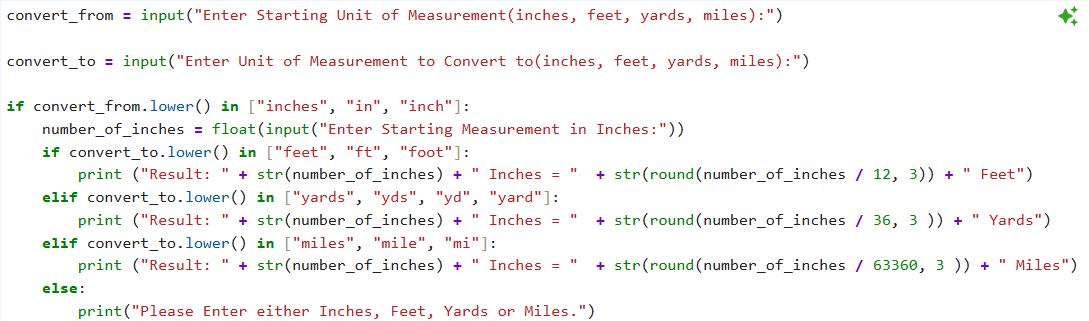
The script:
Prompts the user to select a starting unit and a target unit
Requests a numeric measurement based on the starting unit
Uses conditional logic (
if / elif / else) to determine the correct conversionPerforms the calculation and prints a formatted result
This structure mirrors common patterns used in data scripts and automation tasks.
Python Concepts Demonstrated
Conditional logic: Routing program flow based on user input
User input handling: Collecting and converting input values
Data types: Using floating-point numbers for realistic measurements
Arithmetic operations: Applying conversion factors accurately
Code comprehension: Reading, modifying, and extending existing Python logic

Key Takeaways
This project helped reinforce that:
Scripts benefit from careful handling of numeric precision and output formatting
Reading and modifying existing code is a valuable skill in real-world workflows
Even modest extensions require thoughtful logic and thorough testing
Reflection & Next Steps
This project represents an early step in my Python learning process. As my skills grow, future improvements could include:
Refactoring repeated logic into functions
Using a lookup table or dictionary for unit conversions
Adding loops to support multiple conversions per session
Implementing more robust input validation.